Last update: September 13, 2026
PSPattern
About
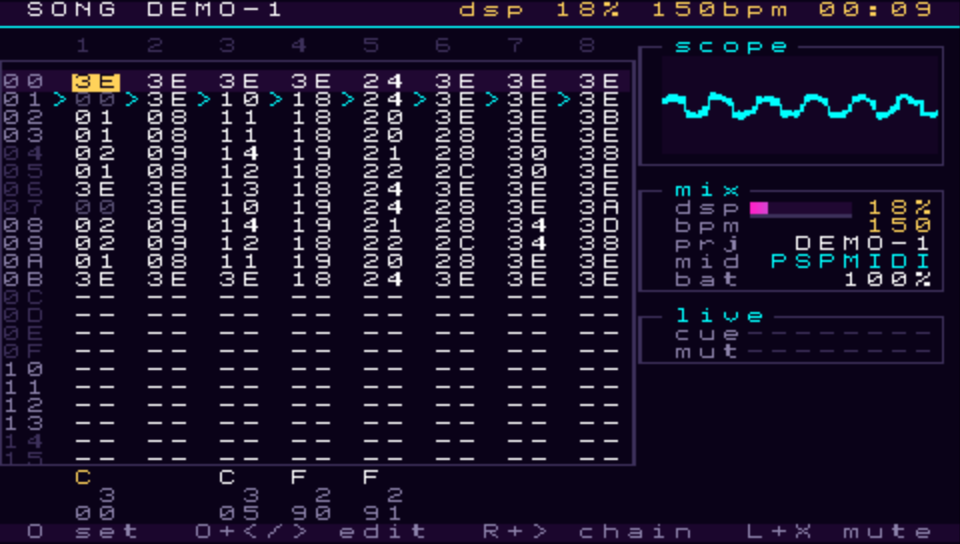
PSPATTERN has eight channels. Each one can play a sampler, a five engine synthesiser, or MIDI notes played on other gear through the PSP-MIDI adapter. It has a drum kit that is generated when a project loads, a delay and a reverb shared by all channels, and a small automation sequencer called a table attached to any step.
It's a fork of LittleGPTracker by Marc Nostromo, free software under the GPL, version 3. The layout comes from LSDJ: a song is a grid of chains, a chain is a list of phrases, and a phrase is sixteen steps of notes and effects. Where LSDJ and M8 do something differently I've usually gone with M8, since most people turning up here have played one or the other and I'd rather not make them relearn anything.
A few features
Everything the program does, listed plainly. Numbers are limits, not
targets.
Sequencer
- Eight channels, each playing a sampler, a synth or MIDI.
- Song grid of chains, 255 chains, 255 phrases, sixteen steps to a phrase.
- Two command columns on every step, forty nine commands.
- Per step probability: a step can be told how likely it is to
happen, and a table column can be told to hop only sometimes.
- Per step vibrato, on the sampler, the synth and MIDI alike, with
its own speed and depth and no instrument setting to change.
- A velocity column on every step, reading 00 to 99, applying to the
sampler and the synth as well as to MIDI.
- 128 tables. A table is sixteen rows of a transpose column and three
command columns, running at tick rate alongside a note, started from a
step or automatically by an instrument. The transpose is an offset, so an
arpeggio underneath it arpeggiates around the shifted pitch rather than
cancelling it.
- 32 grooves, for swing and any other uneven step timing.
- 160 instruments: 128 sampler, sixteen synth, sixteen MIDI.
- Live mode: chains queued per channel, taking effect at the end of the
current phrase or chain, with a per channel countdown of the steps left
before each one switches.
- Bookmarked song rows, jumped between with a modifier and a direction,
saved with the song.
- Per channel mute and solo, latching or momentary depending on which
button you release first.
- Selection, copy, paste, cut, clone and deep clone. Interpolation
across a selected column.
- Undo, twelve steps deep.
- Song repeat or play once. Transpose. Scale constraint.
Sampler
- Plays wav files -- 8/16/24-bit or float, any header dialect --
soundfont presets, or the built in drum kit.
- Loop modes including ping pong and loop sync, adjustable loop points,
and slicing.
- Root note, fine tune, and a choice of interpolation or none.
- Drive and bit crush.
- Filter with cutoff, resonance and type.
- Feedback stage with mix and tune.
- Attack, decay, sustain and release.
- Importing is a menu item: an import sample row sits right
under the instrument type, and the browser opens in a shared samplelib
folder -- created for you if it is missing. Hold SELECT in the browser
to hear the file under the cursor, cleanly, for as long as you hold.
- Importing asks how to store the file. The import screen shows what
it is -- channels, rate, word size, length, size on the card and what
it costs in memory -- and lets you keep it stereo or fold it to mono,
and keep the rate or halve or quarter it, with the memory cost
following your choice. SELECT plays the file as it will be stored,
and TRIANGLE is the only key that imports. The copy the project keeps
is always 16-bit PCM, whatever the original was. Importing a name the
project already holds replaces it, after a yes/no, and every
instrument on it follows.
- A FILE panel on the sample page says what the slot is working with:
the whole name, channels, rate, length in seconds and in frames, and
the memory it takes.
- Dropping wavs straight into the project folder still works with no
import step at all. One sample list: the built in kit first, your
sounds after it.
- A wav that is broken -- truncated, or with a header that lies about
its size -- fails alone with a message, instead of taking the machine
with it.
Synth
- Six engines, all band limited.
- TONE: one oscillator, saw, square, triangle or sine, with pulse
width, a sub oscillator an octave down and a noise source.
- PDX: phase distortion. Saw, square, resonant saw, resonant
triangle, with an envelope sweeping the distortion.
- VAX: up to seven detuned oscillators, saw or pulse, with pulse
width modulation, sub oscillator, noise, hard sync and ring modulation.
- FM: four operators, eight algorithms, per operator ratio, level,
detune and envelope, plus operator four self modulation. The routing is
drawn on screen. Feedback belongs to operator four alone: it does nothing
while operator four's level is zero, and it is heard through whatever
operator four feeds, so it is boldest in the additive algorithm where four
is a carrier. Its bottom half is quiet by design; the tone breaks toward a
saw around the middle and into noise at the top. Detune is a few cents at
most, meant to make two operators at one ratio beat rather than cancel.
Hidden by default because it is the one engine that can outrun the DSP
budget; switch it on from the settings screen.
- VOX: a formant engine. A band limited glottal source and a
breath of noise run through parallel bandpass filters tuned to vowels,
and one knob morphs between two vowels you pick. Choir pads, talkbox
leads, an ooh bass -- and cheaper than FM.
- HIVE: the chord engine. Up to five wavetable voices from one
note: a chord shape from a triad to a ninth, or off for a single note,
spread to detune the voices against each other and width to place them
across the stereo field. Filter, envelopes and the LFO are shared by the
whole chord. A CHRD on a hive note is a real chord, every note at
once. Every voice is one oscillator, so the voices row is the cost knob.
- Resonant filter with low pass, band pass and high pass.
- LFO with selectable destination, restarting with every note. And a
free-running LFO per channel by command: LFO_ starts one that
runs through rests and across notes and instruments until it is
stopped, with rates that can be tempo divisions, from eight bars down
to a thirty-second, phase-locked to the song's grid.
- Amplitude envelope. Glide.
Screenshot(s)
×
![]()